This page covers TJX buyer meeting preparation and the ELUXIOR AI support chat. Use the dedicated PO photo page for the photo steps and secure upload form. Always follow your current PO and the latest official TJX instructions.
New mandatory ELUXIOR photo identification procedure - effective 01 November 2026
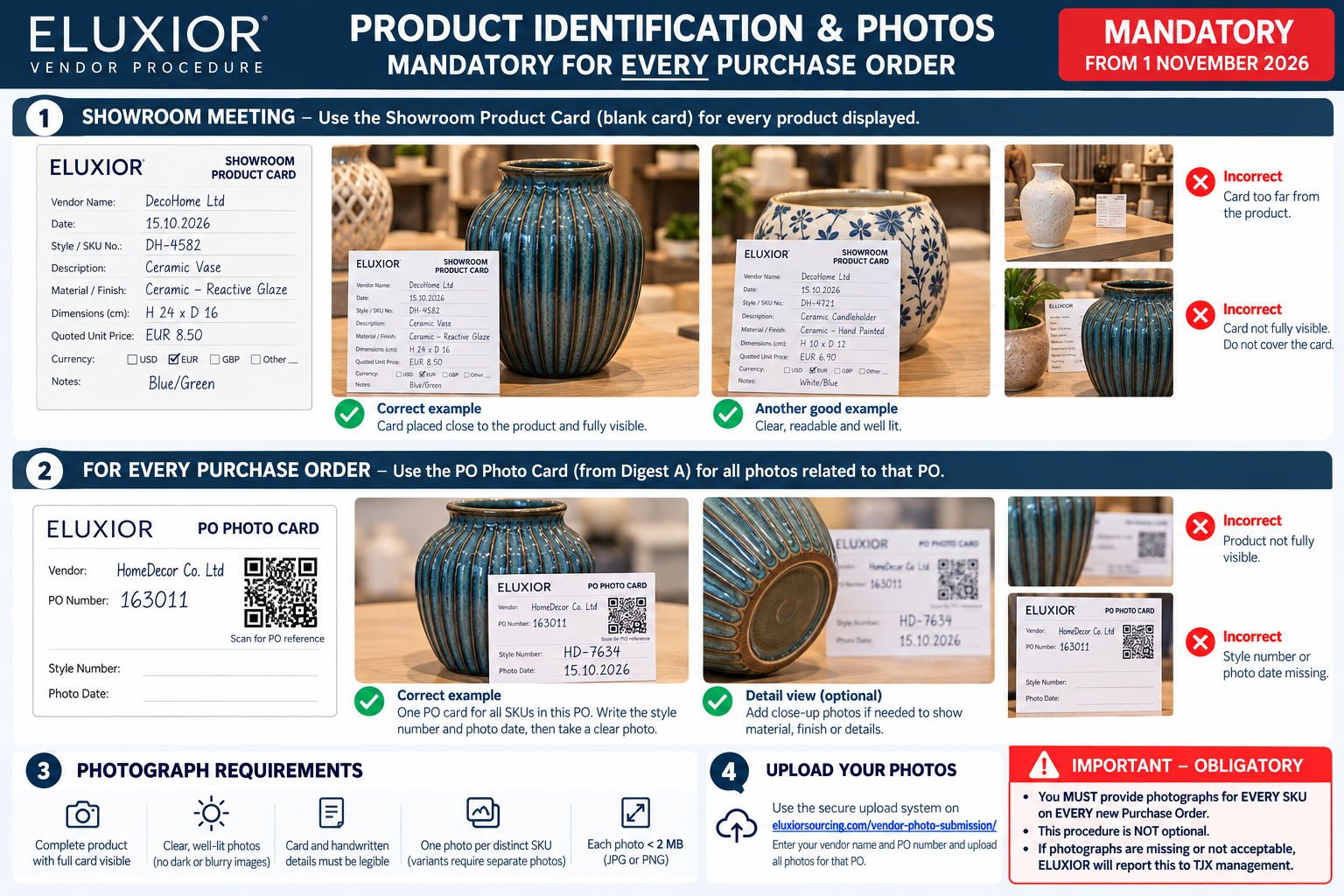
For all buyer meetings from 01 November 2026, print a completed Showroom Product Card for every displayed product. For EVERY new PO issued from 01 November 2026 (mandatory, not optional), photograph every distinct SKU using the correct PO Photo Card. For each new PO, use its own PO Photo Card and secure upload link. When your Digest A includes the PO photo actions, use them for that exact PO. If those actions are missing, contact ELUXIOR for the PO-specific link before uploading. The upload page shows the vendor and PO before submission. Full instructions are on the PO photo page.
Mandatory from 1 November 2026. Enlarge the guide · Download the guide. Example vendors and QR codes are illustrative. Use the secure PO-specific link supplied by ELUXIOR for that PO. If your Digest A does not contain the link, contact ELUXIOR for it. The general page alone cannot identify a PO.
1. Product Photography — Every PO
For the required PO photos, PO Photo Card and secure upload steps, use the PO photo submission page. Each PO needs its own card and upload link. Do not use a showroom card for a placed PO.
Start preparing at least two weeks in advance. Review previous POs, buyer feedback, trend boards and relevant product developments.
Display past TJX orders in a separate area, labelled with Style Nr, PO number and past shipment/delivery date.
Organise new collections by colour/design and, where useful, display shapes and sizes separately.
Every product must have a stable Style Nr, complete dimensions, price, currency and realistic lead time before the buyer arrives.
Prepare stock opportunities separately, with a complete Excel offer showing pictures, dimensions, prices, available quantities and readiness.
Clean and organise the showroom; assign an assistant to handle products, photographs and structured notes.
Print the A5 Product Identification Paper Card
Before the buyer arrives, print and complete one A5 Paper Card for every product displayed in the showroom. Place it next to the product so its style reference, description, material, dimensions and quoted price are clearly visible in the buyer’s photographs. Complete the vendor name, date and other applicable fields.
Important: This is the blank card for showroom preparation, not the PO-specific Photo Card. For a placed PO, use the secure photo link supplied by ELUXIOR. If Digest A does not include it, contact ELUXIOR for the link.
Focus the meeting on selections and decisions, not searching for prices or measuring products.
Record selected Style Nrs, changes, colours, sizes, target prices, quantities, sample requests and deadlines.
Clarify uncertain points immediately; with the buyer and ELUXIOR present, record a short recap video when appropriate.
Before the buyer leaves, confirm selections, actions, owners, deadlines and unresolved questions.
Send a verified written recap promptly and follow up on quotations and developments without repeated reminders.
Prepare requested samples quickly and correctly, but never ship TJX samples before ELUXIOR/TJX approval and confirmed shipping instructions.
Offer water and basic refreshments; do not offer gifts or lunch/dinner invitations.
4. At Trade Fairs — Ambiente, Maison & Objet and Others
Prepare every displayed SKU with dimensions, weight, prices and lead time; keep photos or PDF sheets for variants not displayed.
Show branding examples, export packing/pallet photographs and a short company video (15 seconds ideal; under 30 seconds).
Identify each buyer by full name, company and division; request a business card and start a separate notebook page for every customer.
Photograph seriously discussed products with the buyer's business card beside them, when appropriate, and keep each buyer's material separate.
Record notes and short video clips, confirm action owners and deadlines, and photograph the notebook pages.
Send selection photos, notes and clips to your team immediately; share TJX meeting material with ELUXIOR while the fair is in progress.
Acknowledge buyer emails within four working hours whenever reasonably possible. Be commercially flexible on initial MOQ where sustainable.
5. Packing — Store Ready & Nest Code
Always use the Store Ready and Nest Code configuration shown in the official PO and Distribution Instructions. Confirm any discrepancy with ELUXIOR before packing.
Regular Packing: one SKU per carton; a Store Ready Nest Code is not required.
Store Ready Assorted: different SKUs form a defined assortment and share one Nest Code; they do not need to fit physically inside one another.
Store Ready Nested: different SKUs physically fit inside one another and share one Nest Code.
Record units of each SKU per assortment separately from the number of assortments per master carton.
Check carton dimensions, weights, inner/master cartons, distribution by DC and all applicable marking instructions.
Placed Purchase Orders: When Digest A includes a photo action for a PO, open it to reach that PO's secure photo page. Verify the vendor and PO, download its card there, then upload the photos. If the action is missing, contact ELUXIOR for the secure link.
These explanations are a quick guide only. The official PO, Distro and current ELUXIOR Vendor Procedures Handbook take precedence.
Reference: These meeting guidelines consolidate the ELUXIOR TJX Buyer Meeting Preparation Guide and the ELUXIOR TJX Trade Fair Buyer Meeting Guide. For detailed PO, compliance, shipment and invoicing rules, consult the latest controlled ELUXIOR Vendor Procedures Handbook supplied by ELUXIOR.